Layout menggunakan HTML dan CSS
Nama : Ersad Ahmad Ishlahuddin
NRP : 05111740000016
Kelas : PWEB C
Jadi setelah mempelajari tentang Domain, Hosting, serta CMS. Yang menghasilkan
Tempat Menitip
Ada tugas lain untuk membuat Layout menggunakan HTML dan CSS, inilah hasil kerja saya
Link Website : LINK
Source Code
HTML
CSS
Screenshot
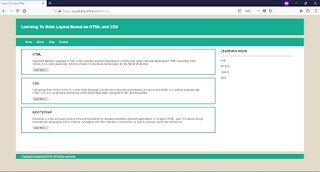
Nama : Ersad Ahmad Ishlahuddin
NRP : 05111740000016
Kelas : PWEB C
Jadi setelah mempelajari tentang Domain, Hosting, serta CMS. Yang menghasilkan
Tempat Menitip
Ada tugas lain untuk membuat Layout menggunakan HTML dan CSS, inilah hasil kerja saya
Link Website : LINK
Source Code
HTML
<html>
  <head>
    <title>Learn CSS dan HTML</title>
    <link rel="stylesheet" href="inicss.css"/>
  </head>

  <body>

  <div class="header">
    <div class="jarak">
      <h2>Learning To Make Layout Based on HTML and CSS</h2>
    </div>
  </div>

  <div class="menu">
    <ul>
      <li><a href="#">Home</a></li>
      <li><a href="http://ersadishla.github.io/cv/" target="_blank">About</a></li>
      <li><a href="http://www.aiersad.blogspot.com" target="_blank">Blog</a></li>
      <li><a href="#">Contact</a></li>
    </ul>
  </div>
  <div class="content">
    <div class="jarak">

    <!-- kiri -->
    <div class="kiri">
     <!-- blog -->
      <div class="border">
        <div class="jarak">
          <h3>HTML</h3>
          <p>Hypertext Markup Language (HTML) is the standard markup language for creating web pages and web applications. With Cascading Style Sheets (CSS) and JavaScript, it forms a triad of cornerstone technologies for the World Wide Web.</p>
          <button class="btn">Read More ..</button>
        </div>
      </div>
     <!-- end blog -->
     <!-- blog -->
      <div class="border">
        <div class="jarak">
          <h3>CSS</h3>
          <p>Cascading Style Sheets (CSS) is a style sheet language used for describing the presentation of a document written in a markup language like HTML.CSS is a cornerstone technology of the World Wide Web, alongside HTML and JavaScript.</p>
          <button class="btn">Read More ..</button>
        </div>
      </div>
     <!-- end blog -->
     <!-- blog -->
      <div class="border">
        <div class="jarak">
          <h3>BOOTSTRAP</h3>
          <p>Bootstrap is a free and open-source front-end framework for designing websites and web applications. It contains HTML- and CSS-based design templates for typography, forms, buttons, navigation and other interface components, as well as optional JavaScript extensions. </p>
          <button class="btn">Read More ..</button>
        </div>
      </div>
     <!-- end blog -->
    </div>
    <!-- kiri -->

    <!-- kanan -->
    <div class="kanan">
      <div class="jarak">
      <h3>LEARNING SOON</h3>
        <hr/>
        <p><a href="#" class="undecor">PHP</a></p>
        <p><a href="#" class="undecor">MYSQL</a></p>
        <p><a href="#" class="undecor">Jquery</a></p>
        <p><a href="#" class="undecor">Ajax</a></p>
      </div>
    </div>
    <!-- kanan -->
    </div>
  </div>

  <div class="footer">
    <div class="jarak">
      <p>Copyright ersadishla 2018.  All rights reserved.</p>
    </div>
  </div>

  </body>
</html>
CSS
body{
 background:#e3dac9;
 color:#333;
 width:100%;
 font-family:sans-serif;
 margin:0 auto;
}

.header{
 width:90%;
 margin:auto;
 height:100px;
 line-height:100px;
 background:#12af92;
 color:#fff;
}

.content{
 width:90%;
 margin:auto;
 height:630px;
 padding:0.1px;
 background:#fff;
 color:#333;
}

.kiri{
 width:70%;
 float:left;
 margin:auto;
 background:#fff;
 height:420px;
}

.kanan{
 width:30%;
 float:left;
 margin:auto;
 background:#fff;
 height:420px;
}

.border{
 border:4px solid #12af92;
 margin-top:1pc;
 padding-bottom:1pc;
 padding-left:2pc;
 padding-right:2pc;
}

.undecor{
 text-decoration:none;
}

.footer{
 width:90%;
 margin:auto;
 height:30px;
 line-height:30px;
 background:#12af92;
 color:#fff;
}
.menu{
 background-color:#12af92;
 height:50px;
 line-height:50px;
 position:relative;
 width:90%;
 margin:0 auto;
 padding:0 auto;
}

.jarak{
 padding:0 2pc;
}

.menu ul {
 list-style:none;
}

.menu ul li a {
 float:left;
 width:70px;
 display:block;
 text-align:center;
 color:#FFF;
 text-decoration:none;
}

.menu ul li a:hover {
 background-color:#74C599;
 display:block;
}
Screenshot

Komentar
Posting Komentar